A user clicks Save three times. Nothing happens. Then a validation message appears, but it tells them the field is invalid without saying which part is wrong.
Engineering may see an exception. Support may see a ticket tomorrow. Product may see a drop in the funnel next week.
The user is seeing the product fail right now.
Error states are product analytics signals when they answer four questions: what failed, where it failed, who it affected, and what the product should do next. If the signal only creates a log or a replay clip, the next user gets the same broken moment.
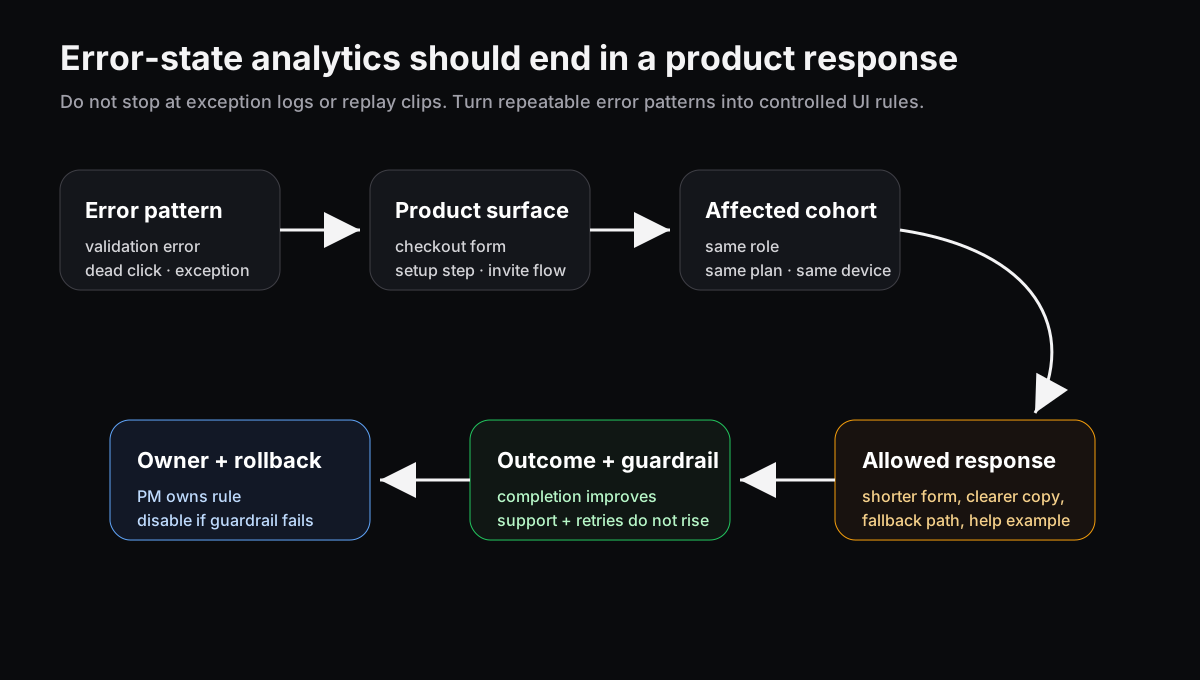
The useful unit is not the error by itself. It is the product rule that follows from a repeatable error pattern.
Error tracking is not the same as product response
Error tracking tools are good at finding what broke. PostHog documents exception events that can be used with product analytics for trends, funnels, and retention, and its replay flow can show what happened around an exception. Sentry connects errors, performance issues, rage clicks, and feedback context. FullStory tracks frustration signals like rage clicks, error clicks, dead clicks, and cursor thrashing.
That evidence is useful. It still needs a product owner.
An exception stack trace can tell engineering where code failed. It cannot decide whether the next trial admin should see a shorter setup path, a clearer permission message, or a fallback action. That is a product decision.
Treat error states like behavioral segments
Do not start with “we had 312 errors.” Start with the repeatable product state.
Use this format:
| Signal | Product question |
|---|---|
| Validation error repeats | Is the form asking for the wrong thing, or explaining it badly? |
| Dead click | Did the interface imply an action that does not exist? |
| Error click | Which user action triggered the failure? |
| Exception after setup | Which cohort is blocked from reaching value? |
Now the team can write a response rule instead of only filing a bug.
Example: “If a trial admin hits the same invite-permission validation error twice, replace the generic error copy with a role-specific explanation and a fallback link to invite by email. Measure invite completion. Roll back if setup exits increase.”
That is small. It is also much more useful than a dashboard tile that says validation errors went up.
Keep the response controlled
Error-state responses can become messy if every failure triggers a clever prompt. Keep the rule boring:
- one error pattern
- one affected cohort
- one surface
- one allowed response
- one success metric
- one rollback condition
This is the same operating discipline behind tracking plans that end in product rules. The signal needs a surface, owner, guardrail, and expiration. Otherwise the product becomes a pile of permanent patches.
Also separate severity. A payment failure, permission bug, or data-loss risk should go through the engineering incident path. A confusing validation state or dead click can often get a product response while the underlying issue is fixed.
Connect error states before they become tickets
Support tickets are late evidence. Support ticket analysis matters, but the better signal often appears first: retries, rage clicks, empty-state exits, dead clicks, and exception-backed actions.
Session replay helps explain the moment. Replay triage becomes more useful when the clip turns into a rule: which surface failed, which cohort saw it, what response is allowed, and what metric proves the response helped.
Where Rayform fits
Rayform sits after the signal is trusted. Your analytics and error tools can keep collecting exceptions, clicks, replays, and events. Rayform uses those behavioral signals to adapt the UI at runtime inside product-approved rules.
The point is not to hide bugs with nicer prompts. It is to stop treating every error as either an engineering log or a support ticket. Some errors are product states. The product should know what to do with them.
See how Rayform turns behavioral signals into runtime UI changes.