A clean tracking plan feels like control. Every event has a name. Properties are typed. The taxonomy is no longer a mess.
Good. But there is one more question.
What should the product do when that event fires?
Most tracking plans stop at measurement. They tell engineering what to emit and tell analytics what to query. Segment describes a tracking plan as a spec for the events and properties a team intends to collect. Mixpanel recommends tying that plan to business goals, KPIs, user flows, events, and properties. Amplitude says taxonomy keeps events clear enough for analysis, cohorts, funnels, and experiments.
That is necessary. It is not the finish line.
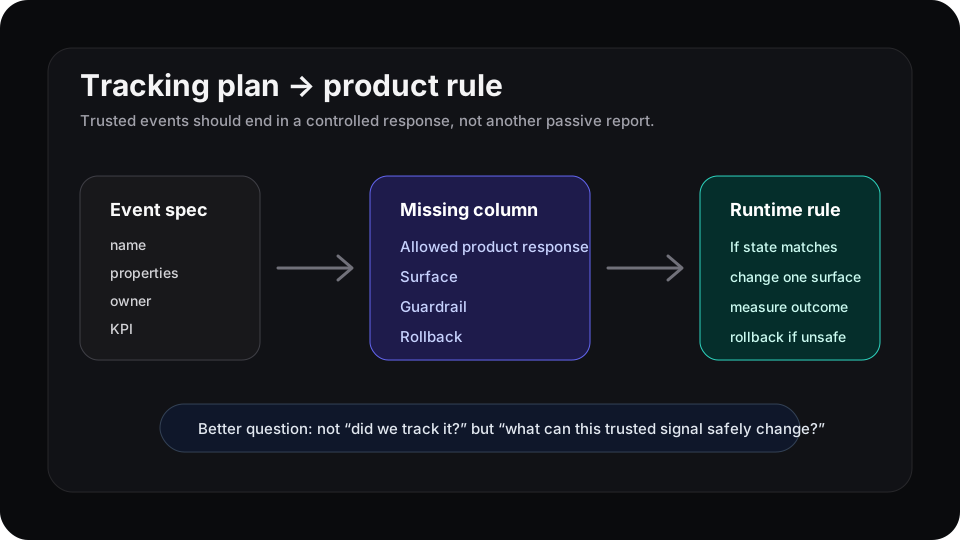
The missing column is not another property. It is the allowed product response.
The tracking plan usually ends too early
A typical tracking plan answers useful questions:
| Column | What it clarifies |
|---|---|
| Event | What happened? |
| Properties | What context came with it? |
| Owner | Who maintains it? |
| Destination | Where does it go? |
| KPI | Which metric does it support? |
That catches a lot of failure. It prevents duplicate names, weird property drift, and dashboards built on vibes.
But it still leaves the product passive. The team can see invite_failed, report_created, or checkout_error_seen, then the next user gets the same static interface until someone opens a ticket.
That is the gap behind instrumentation QA in CI. CI can protect the event. The next step is deciding what the protected event is allowed to change.
Add a product-rule column
For high-value events, add four fields to the tracking plan:
| Field | Example |
|---|---|
| Product state | Trial admin created project but invited nobody within 48 hours |
| Surface | Project home empty state |
| Allowed response | Show a teammate invite example instead of the generic dashboard card |
| Guardrail | Do not increase setup abandonment or support tickets |
Now project_created is not just a reporting event. It can be part of a controlled rule.
This does not mean every event should trigger UI changes. Most should not. Page views, low-confidence clicks, and noisy autocapture events are usually bad inputs for product behavior.
Start with events that already matter to the business: activation, repeat use, expansion intent, support friction, and failure states. If an event is important enough to appear in a weekly product review, it is worth asking whether it should have a response rule.
A small example
Say the tracking plan has this event:
integration_connected
The analytics version says the event supports activation and time-to-value reporting. Useful, but incomplete.
The product-rule version adds:
“If a workspace connects an integration but creates no saved report within 24 hours, change the next dashboard empty state to show one report template for that integration. Measure saved-report rate. Roll back if dashboard exits rise.”
That sentence is much harder to fake than a KPI label. It names the state, surface, response, outcome, and guardrail.
It also connects naturally to behavioral segmentation. A segment is useful when the product knows what to do with it. An event is useful for the same reason.
Keep the rule layer boring
Do not turn the tracking plan into a personalization circus.
Use a boring approval rule:
- one event or event pattern
- one surface
- one response
- one success metric
- one rollback condition
- one owner
If the team cannot name the surface, the rule is not ready. If it cannot name the rollback, the rule is risky. If nobody owns it, it will rot.
This is where a tracking plan becomes more than an analytics document. It becomes a map from trusted behavior to product action.
Where Rayform fits
Rayform sits after the tracking plan. Your analytics stack can keep collecting events, enforcing taxonomy, and feeding dashboards. Rayform uses those behavioral signals to adapt the UI at runtime, inside rules the product team controls.
The point is not to track more. It is to make the events you already trust useful in the product itself.
See how Rayform turns behavioral signals into runtime UI changes.