Behavioral segmentation sounds like progress. Now you have power users, stuck users, expansion-ready accounts, sleepy trials, and teams that keep touching the same broken setup step.
Useful? Yes.
Finished? Not even close.
A segment only matters when it changes what the next user sees. Otherwise it is just a nicer label inside the analytics tool.
Amplitude defines behavioral cohorts as users grouped by actions they took in a product over a time window. Mixpanel frames behavioral segmentation around what users do, from product usage and engagement to feature adoption and funnel behavior. Braze uses similar language for lifecycle messaging: group people by actions, then tailor the experience.
That is the clean definition. The messy part is execution.
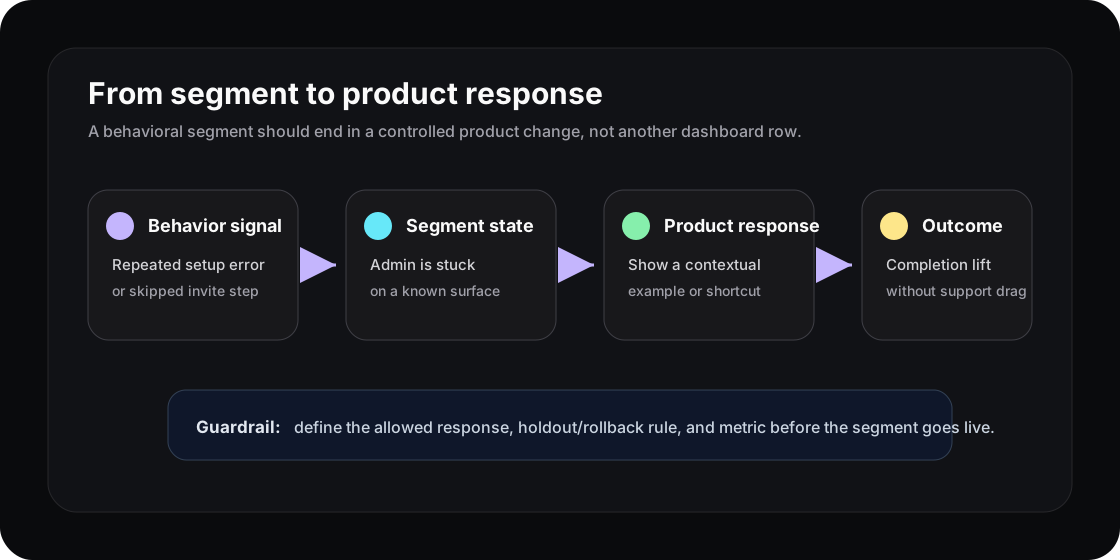
The segment is not the answer. It is the trigger for a controlled product response.
The segment dashboard trap
Most teams stop too early.
They build segments, compare retention, and maybe sync the audience into email or sales tooling. The product itself keeps behaving the same way for everyone.
That creates a strange loop. The dashboard knows a user is stuck. The lifecycle tool knows the user is stuck. The CS note may even say the user is stuck. But the surface where the user is stuck does not change.
This is the same gap behind cohort analysis reports. Knowing the group is not strategy. Strategy starts when the group becomes product state.
A behavioral segment needs four parts
Do not define the segment alone. Define the response system around it.
| Part | Question to answer |
|---|---|
| Segment | What behavior puts this user in the group? |
| Surface | Where should the product react? |
| Response | What small change is allowed? |
| Outcome | What metric proves it helped? |
Example: “trial admins who created a project but did not invite a teammate within 48 hours” is a segment. Good start. But the product rule is sharper:
“When that admin returns to the project home, replace the generic dashboard card with a teammate invite example, and measure whether invited-teammate rate improves without increasing setup abandonment.”
Now the team can argue about the actual change. That is much better than arguing about whether the segment is interesting.
Keep segmentation from turning into chaos
Behavior-based product changes need constraints. Without constraints, personalization becomes a junk drawer of clever ideas.
Use a simple approval rule:
- one segment definition
- one surface
- one response
- one success metric
- one guardrail or rollback condition
The guardrail matters. If a stuck-user prompt improves one setup step but increases support tickets, it is not a win. If an expansion prompt lifts clicks but annoys admins before value is proven, it is just pressure with better targeting.
PostHog’s cohort docs are a useful reminder here. Not every dynamic behavioral cohort can be used everywhere, especially when lifecycle criteria and feature flag targeting collide. That limitation is healthy. It forces teams to decide which signals are stable enough to drive product behavior.
Make segments operational, not decorative
Try this during the next product review.
Take one segment your team already trusts. Maybe it is users who repeat the same error, accounts that use one feature heavily but never invite teammates, or trial users who view pricing before reaching value.
Then write the missing sentence:
“When users in this segment reach this surface, show this response, and judge it by this outcome.”
If you cannot name the surface, the segment is still too abstract. If you cannot name the response, it is still analysis. If you cannot name the outcome, you are guessing.
This connects to activation metrics that predict retention and feature adoption. The pattern is the same: behavior should not only explain the past. It should shape the next product moment.
Where Rayform fits
Rayform sits in that last mile. Your analytics stack can keep collecting events and defining behavioral segments. Rayform uses those behavioral signals to adapt the UI at runtime, inside rules the product team controls.
That does not replace analytics. It gives analytics somewhere to go.
The point is not to create a different product for every user. The point is to stop showing the same static interface when the product already knows the user is in a different state.
See how Rayform turns behavioral signals into runtime UI changes.