Choosing PostHog, Amplitude, or Mixpanel feels like the decision. It is not.
The harder work starts the week after the tool goes live, when the team has to decide which events are trusted, who owns each metric, and what the product should do when a signal appears.
A useful product analytics implementation has one plain output: fewer passive dashboards and more approved product responses.
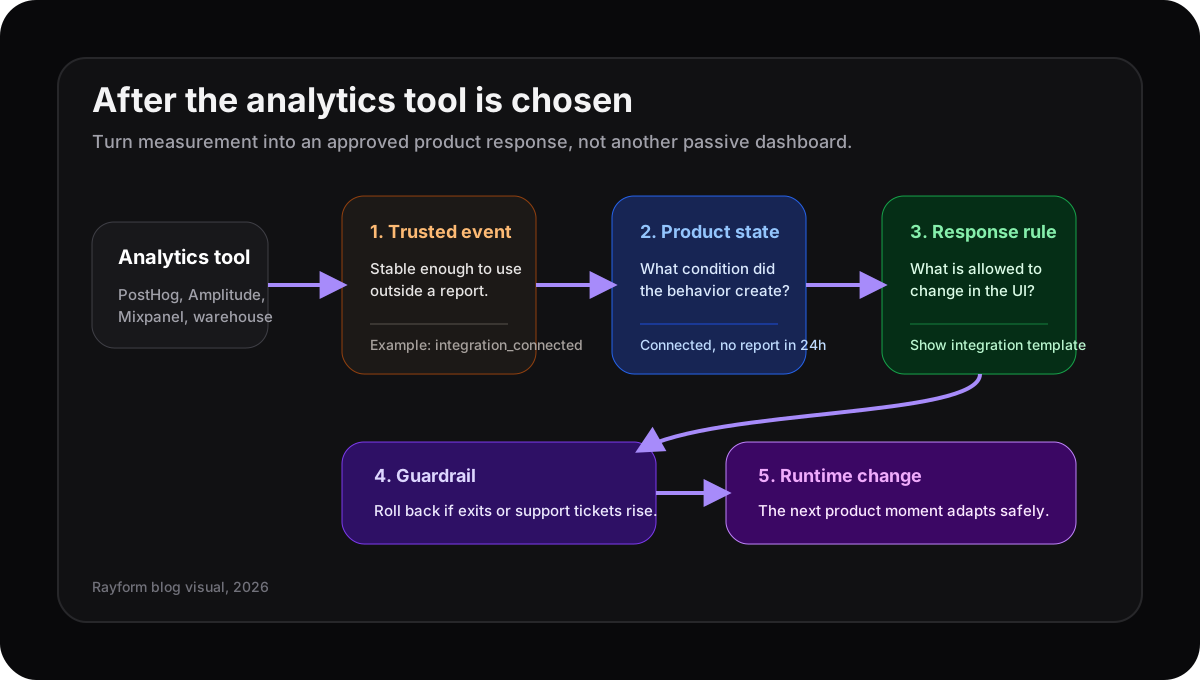
The tool collects behavior. The operating layer decides what changes in the product.
The first dashboard is not the finish line
The usual rollout pattern is familiar. Install the SDK, import old events, build a funnel, create a cohort, and send a few dashboards to Slack.
Good start. Still incomplete.
Mixpanel’s tracking plan docs say the plan should map business goals and KPIs to events, event properties, and user profile properties. Amplitude frames event taxonomy as the structure that supports funnels, journeys, cohorts, and experiments. PostHog’s own product analytics guidance starts with growth events, not every possible click.
That all points to the same problem: analytics is useful only when the team knows which behavior matters.
If the first dashboard cannot answer “what do we change next?”, it is probably a reporting artifact, not an operating system.
Write the operating plan before adding more events
After tool selection, define five fields before the event list grows:
| Field | What it answers |
|---|---|
| Trusted event | Which behavior is stable enough to act on? |
| Owner | Who fixes the event, dashboard, or rule when it breaks? |
| Product state | What user or account condition does the signal describe? |
| Allowed response | What can the product change on the next visit? |
| Guardrail | What tells the team to roll it back? |
That table is boring on purpose. It keeps the implementation from turning into a museum of charts.
For example, integration_connected is not enough. A better operating rule is:
“If a trial workspace connects an integration but creates no saved report within 24 hours, change the dashboard empty state to show one report template for that integration. Measure saved-report rate. Roll back if dashboard exits rise.”
Now the analytics implementation has a job.
Do not track everything first
Tracking everything sounds safe. It usually creates a different problem: nobody trusts the data enough to use it.
Mixpanel warns against tracking every possible user action because it creates unused data and unnecessary development work. The same issue shows up after any tool migration. Teams rebuild the old event swamp in a nicer UI, then wonder why decisions still happen in meetings.
Start smaller.
Pick one product moment with clear business value: activation, repeated feature use, expansion intent, support friction, or failed setup. Instrument the events needed for that moment. Confirm they are reliable. Then write the response rule.
This connects directly to tracking plans that end in product rules and dashboards that do not fix products by themselves. The missing step is not another chart. It is the product decision attached to the chart.
The comparison query is over. Now prove the stack works
The existing PostHog vs Amplitude vs Mixpanel guide helps teams choose the shape of the analytics stack. This is the next question.
Once the tool is chosen, ask:
- Which event would we trust enough to change a product surface?
- Which cohort should see a different response?
- Which metric proves the response helped?
- Which guardrail stops us from annoying users?
If nobody can answer those, the team is not ready for more dashboards. It is ready for a smaller implementation plan.
Where Rayform fits
Rayform sits after the analytics tool. PostHog, Amplitude, Mixpanel, Segment, or the warehouse can remain the source of behavioral truth. Rayform turns approved signals into runtime UI changes inside product rules the team controls.
That is the last mile most analytics rollouts miss.
The goal is not to replace the analytics stack. The goal is to make one trusted signal change one product moment, safely, then repeat the loop.
See how Rayform turns behavioral signals into runtime UI changes.