A product qualified lead is supposed to be better than a form fill because it comes from behavior. The user has tried the product, found some value, and shown signs they may be ready for more.
That part is useful. The mistake is treating the PQL as only a sales alert.
Pendo describes a PQL as someone who has had success using the product, not just someone who opened an email. Gainsight frames PQLs around product interest, usage, and behavioral data. Klipfolio points to signals like regular usage, team invites, pricing-page visits, and chatbot questions.
Those signals should not die in a CRM field. If the product knows a user is close to value, the product should react while the session is still warm.
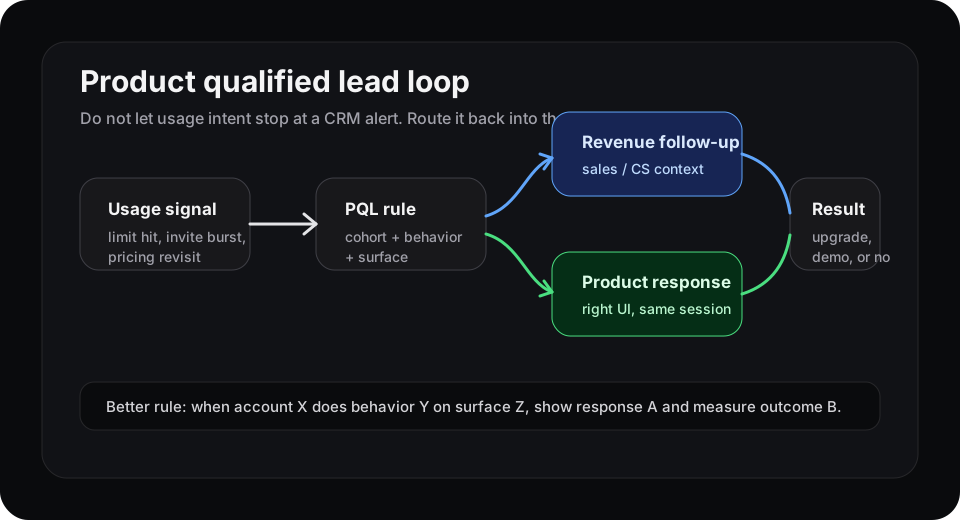
The weak loop routes intent to a queue. The stronger loop routes intent back into the product experience.
A PQL is a moment, not a label
Most teams define PQL rules like this:
- invited two teammates
- created three projects
- hit a usage limit
- visited pricing twice
- used a high-value feature more than once
That is better than a whitepaper download. But the signal has timing. A user who hits an export limit right after building their first report is in a different state from a user who hit that limit last week and never came back.
The label says “qualified.” The moment says what to do next.
What the product should do before sales follows up
A good PQL workflow has two tracks.
The first track can still go to sales or customer success. If an account invites five teammates and reaches a package limit, someone should know.
The second track belongs inside the product. The product should decide what experience fits the signal:
| Signal | Better in-product response |
|---|---|
| Pricing page after active setup | Show the relevant plan difference near the current workflow |
| Team invite burst | Offer admin controls or collaboration setup, not a generic upgrade modal |
| Repeated usage limit | Explain the next tier at the exact limit, with the blocked action preserved |
| High-value feature use once, then stall | Show a saved example, template, or next action tied to that feature |
This is where many PLG programs get leaky. They identify intent, then export it. By the time a person follows up, the user has moved on.
Keep the rule small enough to trust
Do not start with a giant lead score. Start with one conversion path.
For example:
“Trial admins who invite two teammates, create one report, and revisit pricing within 24 hours should see a team-plan explanation inside the report-sharing flow. Measure completed upgrade or booked demo within seven days.”
That sentence has a cohort, behavior, surface, response, and outcome. It is also reviewable. Sales can see why the account was flagged. Product can see which UI changed. Analytics can see whether the response worked.
If the rule is wrong, you can fix it. If the rule is a black-box score, everyone argues about the score.
Where Rayform fits
Rayform sits in the gap between usage signal and product response. It reads behavioral telemetry from tools like PostHog, Segment, Amplitude, and Mixpanel, then adapts the UI at runtime for the cohort showing a specific pattern.
That does not replace sales. It makes the handoff less wasteful. Sales gets a warmer account with context. The user gets help at the moment they show intent.
If this sounds familiar, it is the same action gap behind product analytics dashboards and time-based upgrade prompts. The signal is already there. The product just needs a faster way to answer it.
Try this this week
Pick one PQL rule you already trust. Rewrite it as:
“When user/account X does behavior Y on surface Z, show response A and measure outcome B.”
If you cannot fill in Z, your PQL is too detached from the product. If you cannot fill in A, you have a sales notification, not a product-led growth loop.
See how Rayform turns behavioral signals into runtime UI changes.