A new workspace admin connects Salesforce, grants the wrong scope, sees an error, retries twice, opens the docs, and leaves.
Support calls it an integration issue. Product calls it onboarding drop-off. The user just knows they never got to value.
Short answer: integration setup failures are activation signals. A useful response row names the failed connector state, current surface, next product response, guardrail, and owner before the user disappears into docs or a support queue.
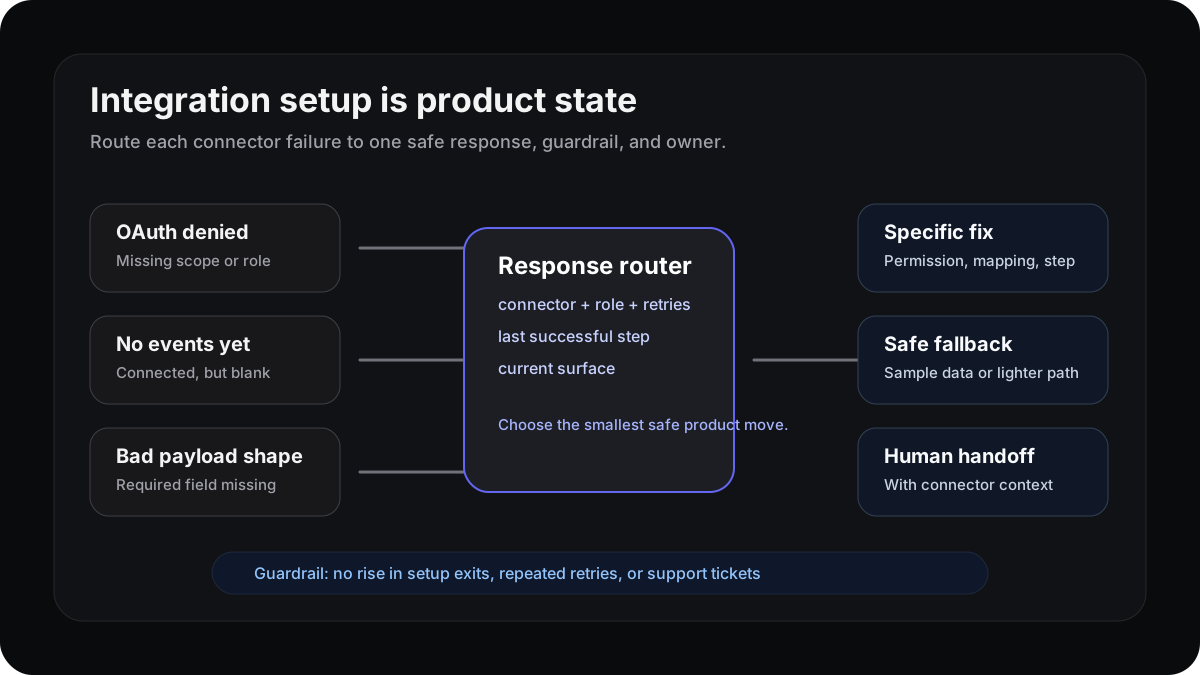
Treat connector state as product state, not a side quest outside onboarding.
The integration is often the activation event
Amplitude’s activation-rate guide lists setup completion, tool integration, data import, connecting a data source, and viewing useful data as possible activation milestones. That fits a lot of B2B products. The first value moment may not be “created account.” It may be “data is flowing from the system we already use.”
That makes an integration failure different from a generic error. It blocks the path to value.
If the product keeps showing the same setup checklist after every failed attempt, the team is wasting one of the clearest behavioral signals it has.
Do not collapse every failure into one error state
Segment’s testing and debugging docs split the problem into useful checks: did data reach the source, did it arrive in the expected format, and did it deliver to the destination? PostHog’s product analytics troubleshooting page makes the same basic point from another angle: events can fail because a library is misconfigured, blocked, or pointed at the wrong setup.
Those are different product moments.
| Failure shape | Better first response |
|---|---|
| OAuth denied or missing scope | Show the exact permission needed and keep the user on the connector page |
| Source connected, no events yet | Show a sample event and the next validation step |
| Events arriving with bad shape | Show the required property or mapping, not a generic docs link |
| Destination delivery failing | Offer a safe fallback path and hand off with connector context |
The response does not need to be flashy. It needs to be specific.
Write the setup response row
Before adding another docs link, write one row:
| Field | Example |
|---|---|
| Signal | Salesforce connected, first sync failed twice because of missing scope |
| Surface | Integration setup page |
| Response | Show the missing permission, preserve the connector state, and offer sample data |
| Guardrail | No rise in setup exits, support tickets, or repeated failed retries |
| Owner | Activation PM owns the response; integrations engineer owns the error taxonomy |
This row keeps the team honest. It separates “we saw friction” from “we know what the product is allowed to do next.”
Escalation should carry behavior, not just a ticket
Appcues’ onboarding guidance frames onboarding as the full path from signup to repeatable value, not a one-time tour or checklist. That matters when setup needs a human. Some integration failures deserve support, CS, or engineering help. Fine.
But the handoff should include the behavior: connector, role, retries, last successful step, error class, docs opened, and the product response already shown. Otherwise the human starts from zero and the user repeats the story.
A good fallback is still a product response. Use demo data. Route to a lighter connector. Let the teammate invite happen before the warehouse sync. Give the admin one safe next step instead of trapping them at the failed integration.
Where Rayform fits
Your analytics stack can detect setup retries, failed auth, empty data states, docs opens, and support starts. Your integration code knows the error class. Rayform’s angle is the middle layer: turn that trusted state into an approved runtime UI response with a guardrail.
This is distinct from role-based onboarding and free-trial activation. The mechanism here is connector state. If the integration is the path to value, the product should react when that path breaks.
Related reading: error states are product analytics signals, time to value is a product signal, and every dashboard needs a response map.