A search box is a promise: tell us what you want, and we will help you find it.
A zero-result page breaks that promise at the exact moment the user is telling you their intent. The usual response is tiny copy, maybe “No results found,” and a blank list. That is not a search result. It is a product shrug.
Short answer: no-results search should become a product response. The product should classify why the query failed, show one useful next step, and measure whether the user recovered.
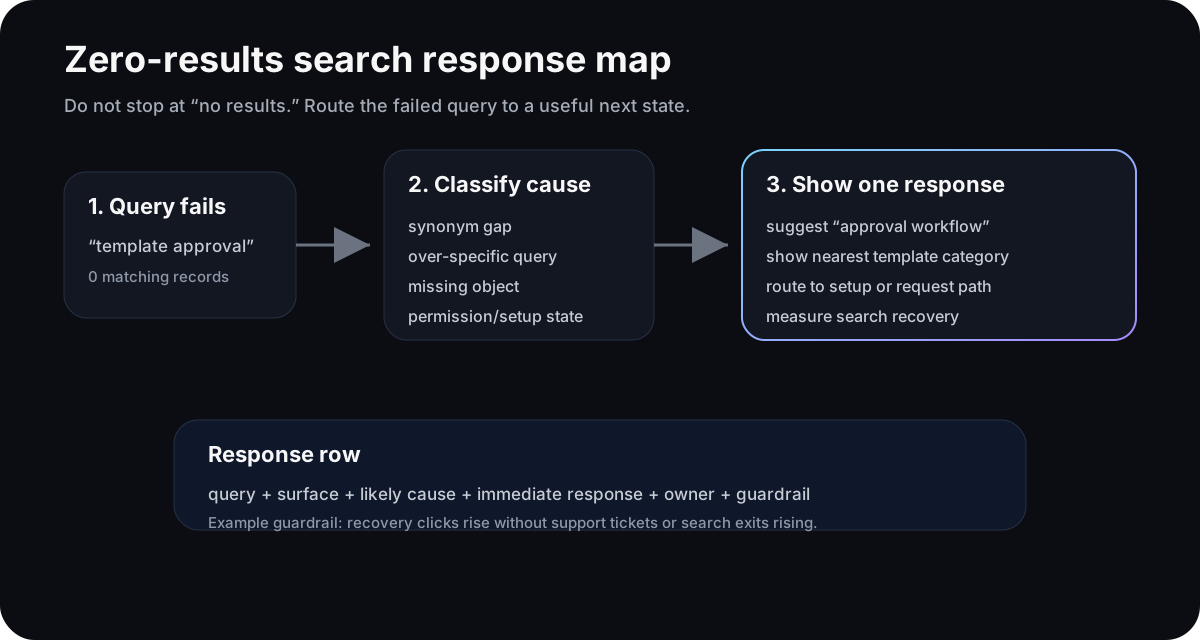
The failed query is the signal. The useful output is the next state, not the empty page.
No results is not one problem
NN/g’s guidance is simple and still easy to miss: a no-results page should make the failure clear, offer ways forward, and avoid mocking the user. Their research also notes that no-results pages often appear even when the content exists but does not match the query.
Algolia makes the same operational point from the search side. Its docs define No Results Rate as the share of searches returning no results, and recommend inspecting the specific failed queries. Its merchandising playbook says a no-results rate above 3-5% is suboptimal and teams should aim below 2%.
Those numbers are useful, but the product question comes next: what should happen for this failed query right now?
A no-results search can mean different things:
| Failed query pattern | Likely cause | Better response |
|---|---|---|
| User uses a different word | Synonym gap | Suggest the matching term |
| Query is too specific | Over-filtered intent | Broaden results or remove one filter |
| Object does not exist | Content or catalog gap | Offer a request, create, or notify path |
| User lacks setup or permission | Product state mismatch | Route to setup, invite, or admin help |
One empty template cannot handle all four.
Write the response row
Before redesigning search, write one row for the failed-search state:
| Field | Example |
|---|---|
| Query | ”template approval” |
| Surface | Workspace search inside onboarding |
| Likely cause | The product uses “approval workflow,” not “template approval” |
| Immediate response | Suggest the approval workflow template category |
| Owner | Activation PM owns the response; search owner owns synonyms |
| Guardrail | Search recovery improves without support tickets or exits rising |
This turns search analytics into product work. The team is no longer staring at a list of failed queries. It is deciding which user intent deserves which response.
Do not make search recovery purely technical
Algolia recommends practical search fixes: synonyms, typo tolerance, stop-word handling, plural matching, query suggestions, related results, and better records. Those are good first moves.
But some failed searches are not search-engine problems. They are product-state problems.
If a trial admin searches for “billing export” and gets nothing because exports are only enabled after connecting Stripe, the right response is not just a synonym. The product should say the export exists after Stripe setup and link to the shortest setup path. If a teammate searches for “invite owner” but lacks permission, the response should explain the role gap and point to the admin request flow.
The search system can find words. The product has to understand state.
Measure recovery, not only no-results rate
No-results rate is the starting metric. Recovery is the product metric.
Track what happens after the failed query:
- Did the user click a suggested query?
- Did they reach a related result?
- Did they complete the intended workflow?
- Did they exit, open support, or repeat the same query?
A lower no-results rate is good only if users land somewhere useful. Otherwise the team may tune search into returning vaguely related noise.
Where Rayform fits
Most teams already have the ingredients: site search logs, product analytics events, roles, permissions, setup state, and session context. The gap is the response layer.
Rayform can take a failed-search signal and adapt the UI at runtime for that user’s state: suggest a synonym for one cohort, show a setup path for another, route a permission issue to an admin request, or suppress a dead-end result for users who cannot use it yet.
This is distinct from empty-state UX. An empty state starts with a blank surface. A zero-result search starts with explicit intent. Treat that intent as a product signal.
Related reading: session replay triage, support tickets as product signals, and integration setup failures.
See how Rayform turns behavioral signals into runtime UI changes.