A teammate opens a shared report, hits “Access denied,” tries the link twice, asks an admin in Slack, and leaves the product.
The system did its job. The user still got stuck.
That is the annoying shape of permission errors in SaaS. They are partly security, partly collaboration, and partly onboarding. If the product only says no, it loses the chance to route the user to the next safe step.
Short answer: a permission error should become a controlled product response. Name the blocked action, user role, resource, safe explanation, owner, and recovery path before the user leaves.
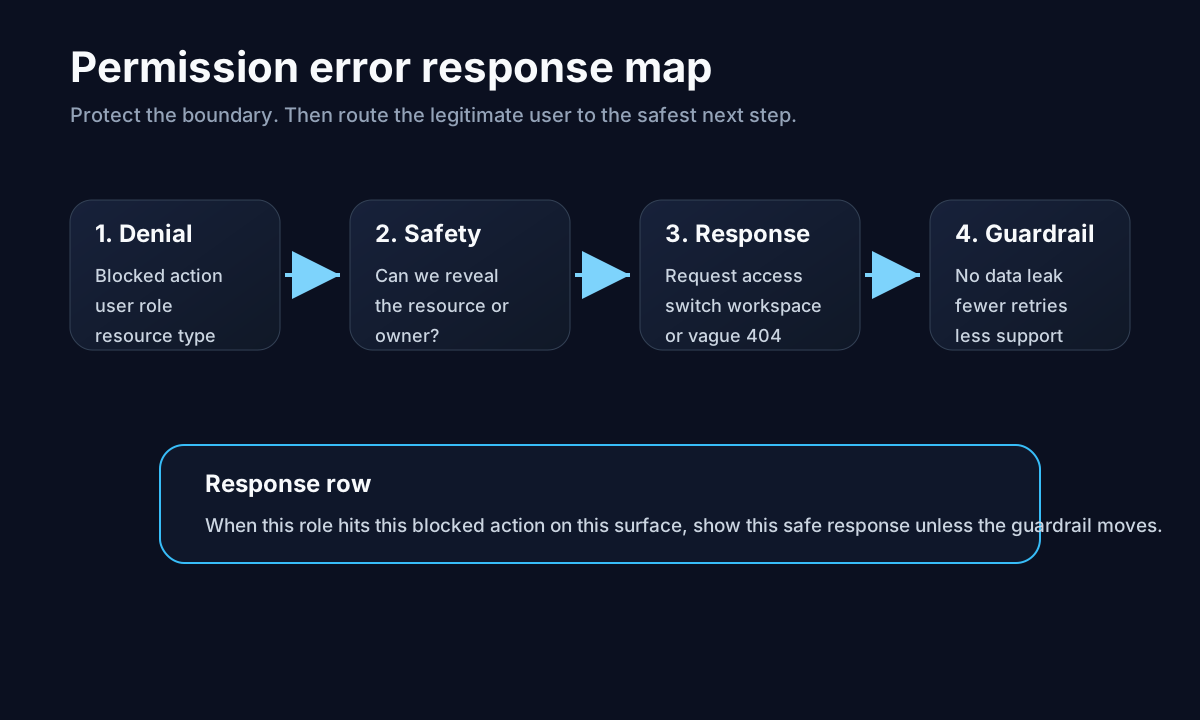
The denial protects the resource. The response helps the right user recover without weakening access control.
Access denied is not one state
Contentsquare’s guide to SaaS permissions makes the implementation point clearly: products should check permissions, not hard-coded roles, because roles change and permissions need context. WorkOS makes a similar argument when it explains why roles alone often become too broad for real SaaS products.
That matters for UX because a permission denial can mean several different things:
| Blocked state | Better response |
|---|---|
| Viewer lacks edit access | Explain the missing permission and offer an admin request |
| Admin lacks setup scope | Route to the exact setting or integration owner |
| Resource belongs to another workspace | Show a safe workspace switch or request path |
| User should not know the resource exists | Use a vague not-found state and avoid leaking details |
One generic “you do not have access” page cannot handle all four.
Do not hide every denial behind a redirect
A UX Stack Exchange answer on access-denied pages frames the tradeoff well: a 403 can help when the user should know they need permission, while a vague 404 can be safer when revealing the resource exists is itself a risk. Silently sending the user to the homepage is usually the worst middle path because it does not explain what happened.
For product teams, the decision should be explicit:
| Question | If yes |
|---|---|
| Can the user safely know the object exists? | Say which permission is missing |
| Is there a known admin or owner? | Offer a request-access path |
| Is the block caused by setup? | Route to the setup owner or checklist step |
| Would the message leak sensitive data? | Use a vague not-found state |
The security rule comes first. Then the product response follows.
Write the permission response row
Before changing the access-denied screen, write one row:
| Field | Example |
|---|---|
| Signal | Invited analyst opens shared dashboard without report-view permission |
| Surface | Shared report link |
| Safe explanation | ”You need report access in this workspace” |
| Product response | Let the user request access from the workspace admin |
| Guardrail | No rise in unauthorized retries, support tickets, or data-exposure risk |
| Owner | Admin-experience PM owns the response; security owns disclosure rules |
This row keeps the team from solving the wrong problem. The goal is not to make denial nicer. The goal is to preserve the permission boundary and still move legitimate users forward.
Permission copy needs timing and recovery
NN/g’s permission-request research is about mobile OS permissions, but the principle transfers: users need to understand why access is needed, why it matters now, and how to reverse or recover from a denial. Material Design says denied permissions should provide feedback and options.
That is the bar for SaaS permission errors too.
A blocked teammate does not need a lecture about RBAC. They need one sentence that explains the missing permission, one safe action, and a path back after access changes.
Bad: “Access denied.”
Better: “You need report-view access for this workspace. Ask Jordan for access, or switch to a workspace where you already have permission.”
Only say that if it is safe to reveal the workspace and owner. If not, keep the message vague. Good permission UX is not the same as maximum disclosure.
Where Rayform fits
Most teams already have the raw inputs: roles, permissions, workspace state, invite source, resource type, retries, support starts, and session context. The missing piece is the response layer.
Rayform can use trusted product state to show the right approved response at runtime: request access for one cohort, route an admin to setup for another, switch workspace for a third, or show a vague not-found page when disclosure is unsafe.
This is distinct from error-state response rules and role-based onboarding. A permission error is not just a bug or a persona branch. It is a safety boundary with a recovery problem attached.
Related reading: support tickets as product signals, zero-result searches need product responses, and integration setup failures.
See how Rayform turns behavioral signals into runtime UI changes.