A user belongs to three workspaces. They open the product from an invite, land in the wrong workspace, see an empty dashboard, click around, and leave.
The auth system may be correct. The product response is still wrong.
That is the weird thing about multi-tenant SaaS. Tenant context is usually treated as plumbing: organizations, workspaces, roles, billing, SSO, permissions. But for the user, that context decides whether the product feels useful or broken.
Short answer: multi-tenant SaaS products should treat workspace context as product state. Before showing onboarding, empty states, upgrade prompts, or errors, check the tenant, workspace, role, invite source, account activity, and safe recovery path.
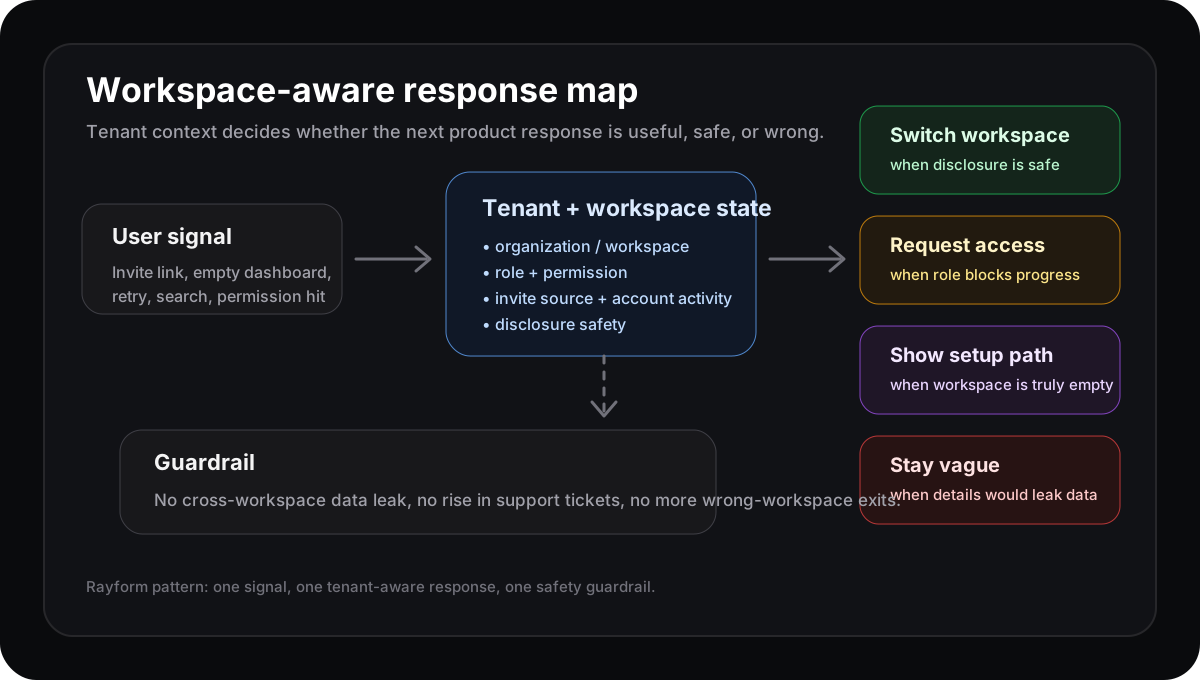
The workspace is not just where data lives. It changes which response is safe and useful.
Multi-tenancy changes the product moment
WorkOS describes organizations as top-level resources that can represent customers, workspaces, memberships, roles, SSO, directory sync, audit logs, and shared resources. Clerk makes the architecture point too: multi-tenancy lets one app serve many customers while isolating users, settings, workflows, auth, and data.
That isolation is necessary. It also creates product states that a single-user app does not have.
A blank dashboard might mean:
| Workspace state | Better response |
|---|---|
| User is in a personal test workspace | Offer sample data or a setup path |
| User accepted an invite to a real team | Route to the shared project or invite context |
| User lacks permission in this workspace | Offer a safe request-access path |
| User belongs to several workspaces | Suggest the likely workspace before teaching basics |
If the product ignores tenant context, it may explain the wrong thing beautifully.
The workspace switcher is not a tiny UI detail
A workspace switcher often looks like navigation. In B2B SaaS, it can be the difference between activation and confusion.
If someone opens a shared report but the product drops them into their empty personal workspace, the next screen should not say, “Create your first report.” The user was trying to view a team object. The better response is a safe workspace correction, a permission request, or a clear explanation that the report belongs somewhere else.
A useful response row looks like this:
| Field | Example |
|---|---|
| Signal | Invited teammate opens report link from email |
| Tenant state | User belongs to personal workspace and Acme workspace |
| Surface | Empty dashboard after sign-in |
| Product response | Suggest switching to Acme before showing onboarding |
| Guardrail | No rise in cross-workspace data exposure or support tickets |
| Owner | Activation PM owns the response; platform owns tenant safety |
That row keeps the team from treating a tenant-routing problem as generic onboarding friction.
Account-level analytics belongs in the rule
Userlens argues that B2B SaaS teams need account-level analytics because adoption, churn risk, expansion, and value often happen at the organization or team level, not only at the individual level. That matters here.
The product should know whether the workspace is new, active, blocked, expanding, or at risk. The same user behavior can mean different things depending on the account state.
If a solo trial user sees an empty workspace, sample data may help. If a teammate in an active account sees the same empty state, the problem may be workspace selection or permission. If an admin in a mature account sees it, the right response may be setup recovery or a support handoff.
Same surface. Different tenant state. Different response.
Do not turn tenant context into personalization soup
This can go sideways fast. Multi-tenant products carry security and trust boundaries. A helpful response should never leak a workspace, resource, teammate name, or account detail the user should not see.
So the rule needs a guardrail:
- If it is safe to reveal the workspace, suggest a switch.
- If the resource exists but access is missing, offer a request path.
- If disclosure would leak data, use a vague not-found state.
- If the account state is uncertain, do less.
Good workspace-aware UX is not maximum cleverness. It is the smallest safe correction.
Where Rayform fits
Most teams already have the inputs: organization ID, workspace ID, role, permission, invite source, recent behavior, account activity, setup state, and support starts. The gap is the response layer.
Rayform can use trusted product state to adapt the UI at runtime: suggest the likely workspace, show sample data, route an invited user to the shared object, request access, or stay quiet when disclosure is unsafe.
This is distinct from permission-error responses and role-based onboarding. Those start with access boundaries or persona paths. This starts one level earlier: which tenant and workspace is the user actually in, and what is safe to do next?
Related reading: empty states should move users toward activation, integration setup failures need product responses, and account expansion needs product signals.
See how Rayform turns behavioral signals into runtime UI changes.