A user clicks the little survey and writes, “Setup is confusing.”
Helpful? A little. Dangerous? Also yes.
If the team cannot see what happened before that sentence, the comment turns into opinion soup. Was the user stuck on permissions, connectors, invited teammates, sample data, or billing? Did five users hit the same wall, or did one edge-case account wander into the wrong flow?
Short answer: in-app feedback becomes useful when every response is paired with the user’s recent behavior, cohort, product surface, possible response, guardrail, and success metric. The text says what the user felt. The behavior shows where the product should change.
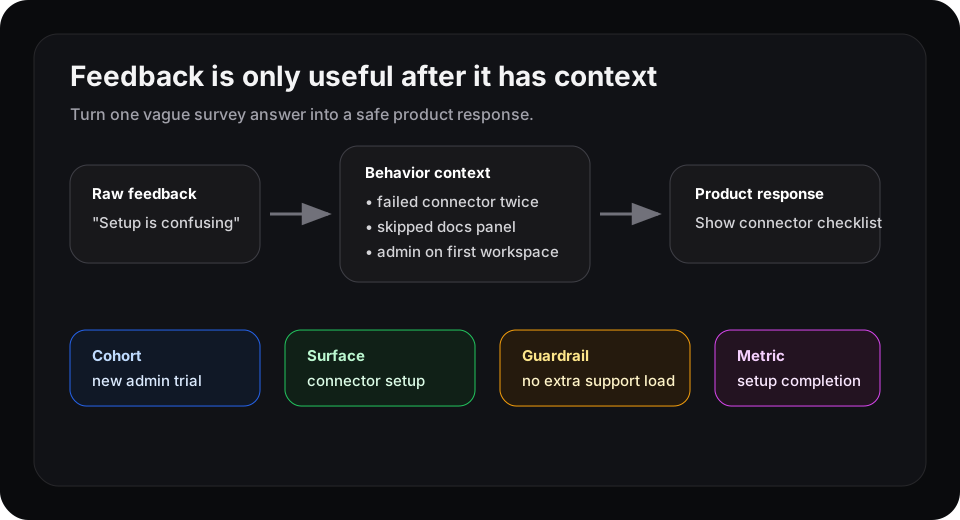
The comment starts the investigation. The context map decides what the product can safely try.
Feedback text is weak evidence by itself
Amplitude’s guide to in-app feedback makes the basic case well: feedback collected inside the product has better timing because the user is still in the moment. It also points out the important split. Numbers show where something is happening; open text explains why it may matter.
That split is where teams get into trouble. A survey answer can sound specific while still missing the product context.
“The dashboard is confusing” could mean:
- the user never created the first report
- the workspace has no events yet
- a permissions role hid the useful section
- the user expected a template, not a blank canvas
- the dashboard is fine, but onboarding sent them there too early
Those are different product problems. They should not all trigger the same roadmap ticket.
Add the behavior before deciding what to do
A useful feedback row has more than a score and a comment.
| Field | Example |
|---|---|
| Feedback | ”Setup is confusing” |
| Recent behavior | Failed connector setup twice, skipped docs, opened invite page |
| Cohort | First workspace, admin role, trial day two |
| Surface | Connector setup empty state |
| Product response | Show a shorter checklist with one recommended connector |
| Guardrail | Do not increase support tickets or setup time for experienced admins |
| Metric | Connector completed within the next session |
Now the team has a product decision instead of a complaint. If the same pattern shows up again, the response can be tested on the matching cohort instead of blasted across every user.
This is also the difference between feedback management and product adaptation. Feedback management organizes what people said. Product adaptation changes what similar users see next.
Targeting the survey is not enough
PostHog’s Surveys page is a useful signal for where the category is moving: survey answers are more valuable when teams can connect them to analytics, recordings, and user context. The survey is not a separate research artifact. It sits inside the behavioral system.
But survey targeting and product response are still different jobs.
Targeting asks, “Who should see this question?”
A response rule asks, “What should the product do for users who answer this way and share the same behavior pattern?”
That second question is harder. It needs limits. A frustrated enterprise admin might need a sales-assist path. A solo trial user might need a simpler checklist. A power user might need no prompt at all because the product would only get in their way.
A simple rule for acting on feedback
Before turning an in-app response into a product change, write one sentence:
When users in this cohort give this feedback after this behavior, we will change this surface with this response, unless this guardrail gets worse.
Example:
When first-workspace admins say setup is confusing after failing connector setup twice, show a one-step connector recommendation on the setup page, unless support tickets or setup time increase.
That sentence is small on purpose. It keeps feedback from becoming a giant theme bucket. It also makes rollback easier because the team knows which cohort, surface, and metric were touched.
Where Rayform fits
Tools like Amplitude, PostHog, Userflow, and survey products help teams collect and analyze the signal. That is necessary.
Rayform’s angle is the next step: pair behavioral telemetry with approved product responses so the interface can adapt for users who match the same pattern. Not every complaint deserves a new UI. But when feedback and behavior agree, the product should not wait for another meeting to react.
A good in-app feedback program should answer one blunt question: what changes for the next user who hits this same moment?
If the answer is “we add it to the backlog,” the feedback still has work to do.
Related reading: support tickets can become product analytics signals, and every important dashboard should have a response map.