A blank dashboard feels harmless. It is just an empty state, right?
Not really. For a new user, that blank surface might be the first honest test of the product. They have no projects, no imported data, no saved view, no teammate activity. The product can either explain what is happening and move them toward value, or it can make them guess.
Short answer: an empty state should name why the surface is empty, pick the next value action for that user state, and protect the product with a guardrail. One static CTA is usually too blunt.
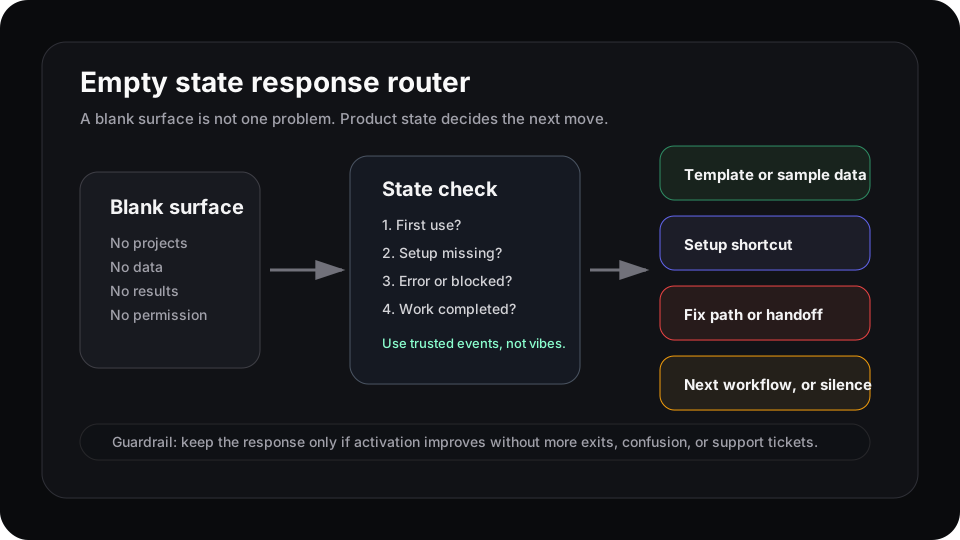
The blank screen is only the input. Product state decides the response.
Empty state UX is an activation problem
NN/g describes empty states as places where content does not exist, has not been configured, or cannot be displayed. Their guidance is practical: use the moment to communicate system status, improve learnability, and give users a direct path into key tasks.
That matters in SaaS because the first empty dashboard often sits between signup and activation. Userpilot makes the same point from the product side: empty states can reduce onboarding friction and time to value, or they can leave users confused enough to churn.
So the question is not, “What copy should we put in the blank box?” The better question is, “What does this blank box mean for this user right now?”
Not every blank state needs the same CTA
Carbon’s empty-state pattern separates no-data moments, user-action feedback, and error-management states. That distinction is useful because each one needs a different product response.
| Empty state | What it usually means | Better response |
|---|---|---|
| First use | The user has not created anything yet | Show a template, sample data, or one first action |
| Missing setup | The product cannot show value until data arrives | Route to the shortest setup path |
| Blocked or error | Permission, config, or sync failed | Explain the fix or offer a handoff |
| Work completed | The empty space is a good outcome | Confirm completion and stay quiet, or suggest the next workflow |
A generic “Create your first project” button only fits one of those states. If the user is blocked by permissions, it is wrong. If data is still syncing, it is misleading. If they finished the job, it is noise.
Write the response row before redesigning the page
Before changing an empty state, write one row:
| Field | Example |
|---|---|
| Cohort | Trial admins who connected a source |
| Surface | Dashboard empty state |
| Signal | No saved view after 24 hours |
| Response | Show one report template using that source |
| Guardrail | No increase in dashboard exits or support tickets |
| Owner | Activation PM |
Now the empty state is not a decorative component. It is a controlled product response.
This also keeps the team honest. If you cannot name the signal or guardrail, you are probably designing from vibes. Nice vibes, maybe. Still vibes.
Use empty states to teach the next action
UserOnboard calls empty states a major onboarding opportunity because they appear when users are already asking, “What now?” Appcues’ product-led onboarding guidance points in the same direction: contextual in-app prompts should move users toward activation, not teach every feature.
That is the bar. A useful empty state does not explain the entire product. It helps the user take the next action that makes this surface valuable.
For a reporting product, that might be importing a sample dataset. For a collaboration product, it might be inviting one teammate into the active workspace. For a workflow tool, it might be starting from a template instead of an empty canvas.
Where Rayform fits
Analytics can tell you that a cohort keeps landing on a blank dashboard. Session replay can show confusion. Support tickets can explain the language users use when they get stuck.
Rayform sits in the response layer. It can take trusted product state and adapt the empty surface at runtime: show sample data for one cohort, a setup shortcut for another, a fix path for blocked users, or nothing for users who already reached value.
The goal is not to make every empty state clever. Good empty states are usually quiet. The goal is to stop treating blank surfaces as one design problem and start treating them as product-state decisions.
Related reading: time to value is a product signal, role-based onboarding needs product responses, and feature discovery is not feature adoption.
See how Rayform turns behavioral signals into runtime UI changes.