A CSV import can be the first real value moment in a B2B product. It can also be the first time the product tells a new customer, in effect, “good luck fixing your spreadsheet.”
That is a bad place to lose someone. The user is trying to bring their data into the product. If the import fails, activation is not delayed by education or motivation. It is blocked by data.
Short answer: CSV import failures need product responses. Split the import into file, mapping, validation, and submit states, then route each failure to the smallest safe recovery path.
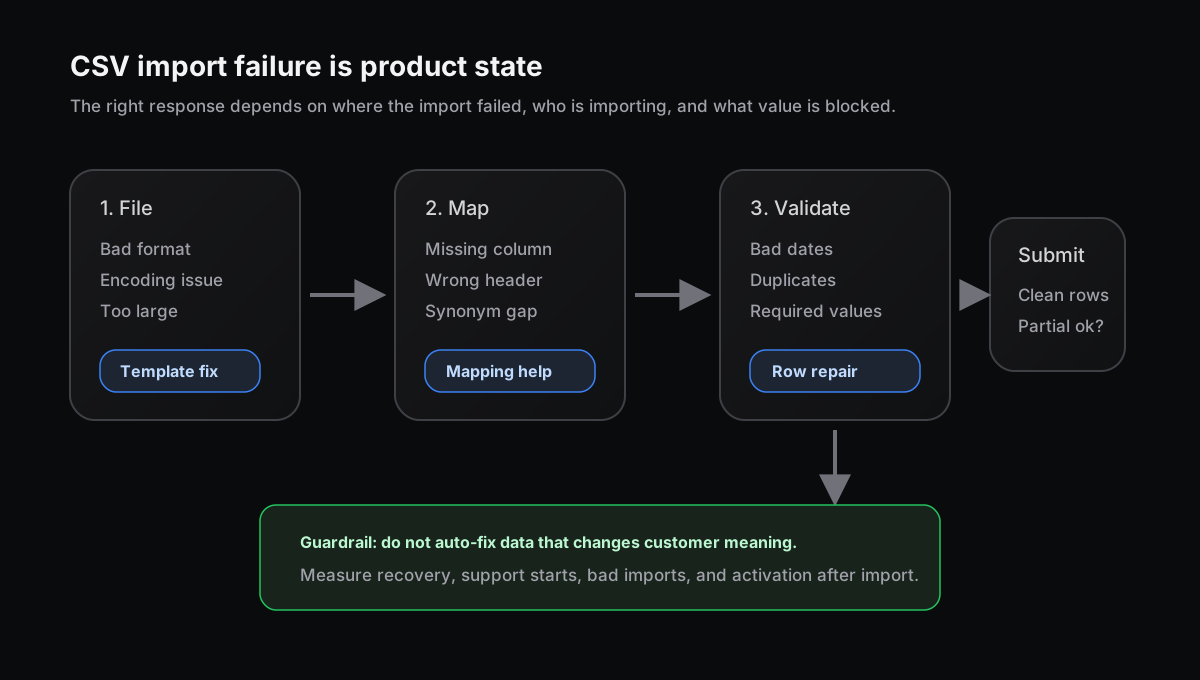
The import error is not just a validation event. It tells you which setup response the user needs next.
CSV import is onboarding, not plumbing
Patrick McKenzie wrote that CSV and Excel upload is common in B2B SaaS because most customer data already exists somewhere else: spreadsheets, old systems, inboxes, and informal databases. The product becomes useful only after that data moves.
That is why import UX matters. A vague “Import failed” message does not only create a support ticket. It interrupts the handoff from old workflow to new product.
Flatfile makes the same product point from the importer side: CSV import often becomes one of the first interactions for products that start as an empty box. If the product cannot import the user’s data cleanly, the user starts wondering what else will break.
Import failure is not one state
A failed upload can mean several different things:
| Failure state | Better response |
|---|---|
| File cannot be parsed | Offer a template, format example, or supported file type |
| Columns do not match | Show mapping suggestions and remember prior mappings |
| Rows fail validation | Mark the exact rows and fields that need repair |
| Import is partly valid | Let the user import clean rows if the business rule allows it |
| User lacks permission | Route to an admin or safe request path |
CSVBox recommends a simple flow: file, map, validate, submit. That sequence is useful because each step creates a different product state. A parsing issue needs a different answer than a missing email field or a duplicate account ID.
One generic error page cannot handle all of that.
Write the import response row
Before redesigning the importer, write one row for the failure:
| Field | Example |
|---|---|
| Signal | Trial admin uploads contacts CSV and 22% of rows fail validation |
| Surface | Contact import flow during setup |
| Failure type | Missing email, duplicate company, mixed date formats |
| Product response | Show row-level errors and allow clean rows to continue |
| Guardrail | No rise in bad records, support starts, or abandoned imports |
| Owner | Activation PM owns recovery; data platform owns validation rules |
This row keeps the team from treating every import problem as an engineering defect. Some are parser bugs. Some are schema decisions. Some are onboarding blockers. Some are permission problems. The response should match the shape of the failure.
Translate validation into recovery
Dromo’s guide names the usual culprits: mismatched schemas, missing columns, mixed date formats, malformed CSV structure, and large files that time out. Those are real technical problems, but the user still needs plain instructions.
Bad: “Field email failed regex validation.”
Better: “Row 18 needs a valid email, like user@example.com.”
Better still: show the row, show the field, keep the valid rows safe, and tell the user whether they can continue with a partial import.
That last part matters. In many SaaS workflows, importing 900 clean contacts now is better than blocking the whole account because 17 rows need cleanup. In other workflows, partial import is dangerous. The product should make that rule explicit instead of surprising the user after they click submit.
Where Rayform fits
Most teams already log the ingredients: upload attempts, parser errors, mapping choices, validation failures, account stage, user role, retry loops, support starts, and activation after import.
Rayform’s angle is the response layer. It can use trusted product state to choose the right approved recovery path at runtime: show a mapping suggestion, offer a sample template, continue with clean rows, route an admin request, or suppress another retry when the user needs help instead.
This is distinct from integration setup failures and empty-state activation. Those start after a connector or surface is empty. CSV import failure starts earlier, when the customer’s data cannot enter the product at all.
Related reading: permission errors need product responses, support tickets as product signals, and time to value is a product signal.
See how Rayform turns behavioral signals into runtime UI changes.