A feature flag can put 5% of users on a new path. That does not mean the product knows what to do with those users.
The rollout slider moves. Dashboards light up. Someone watches errors, latency, and maybe conversion. If the numbers look bad, the team pauses or rolls back. If they look fine, the rollout grows.
That is safer than a big-bang release, but it still leaves a product question unanswered: what should exposed users see when their behavior shows friction?
Short answer: feature flag exposure needs a response plan. Before increasing rollout, write the surface, expected signal, allowed product response, guardrail, rollback rule, and owner.
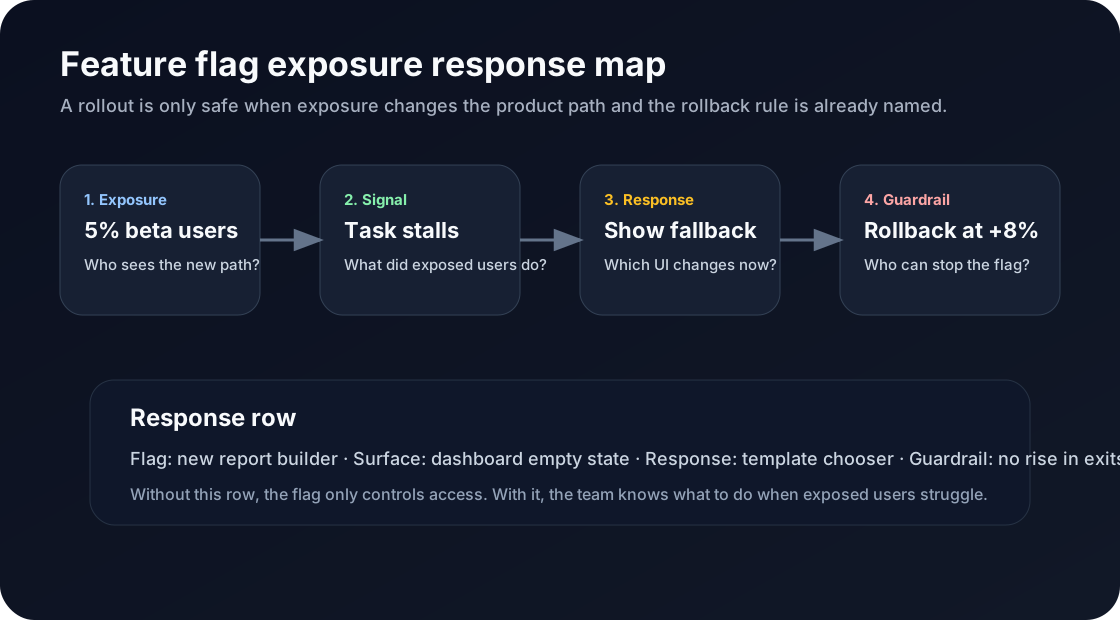
The flag controls who sees the path. The response plan decides what happens when that path works, stalls, or breaks.
Exposure is not the same as learning
LaunchDarkly defines feature flags as runtime controls that let teams enable, disable, target, and roll out features without redeploying. That control matters. It separates deploy from release and gives the team a kill switch.
Spotify’s Confidence glossary describes progressive rollout as gradually increasing exposure, often through stages like 1%, 5%, 25%, and 100%, while monitoring guardrails and rollback conditions.
Good. Necessary. Still incomplete.
A rollout can answer, “Did the new thing break?” It does not automatically answer, “What product response should this user get next?” Those are different jobs.
Write the exposure response row
Before moving a flag past the first exposed cohort, write one row:
| Field | Example |
|---|---|
| Flag | New report builder enabled for 5% of trial admins |
| Surface | Dashboard empty state and report creation flow |
| Signal | User opens builder twice but creates no saved report |
| Product response | Show a template chooser instead of the blank builder |
| Guardrail | No increase in dashboard exits or support tickets |
| Rollback | Disable the flag if exits rise by 8% for exposed users |
| Owner | Activation PM owns the response; engineering owns the rollback path |
This keeps the flag from becoming a traffic valve with no product brain behind it.
The response may be tiny: show a template, hide a prompt, change copy, route to setup, or suppress the new path for a cohort. The point is not to over-automate the release. The point is to decide what behavior means before everyone is staring at a chart.
Measure exposed behavior, not just system health
Datadog’s guardrail-metrics guidance is useful here: a guardrail is a specific health indicator that can pause or roll back a rollout when it crosses a dangerous threshold. Their examples include error rate, CPU, latency, RUM performance, and product analytics KPIs.
For product teams, the product analytics part is the trapdoor. Technical health can pass while the experience still gets worse.
A new onboarding step may keep latency flat and still cause users to abandon setup. A redesigned builder may have no errors and still produce fewer saved reports. A paywall experiment may avoid incidents and still confuse the wrong accounts.
So the rollout plan needs both kinds of guardrails:
| Guardrail type | What it protects |
|---|---|
| Reliability | Errors, latency, crashes, failed requests |
| Product behavior | Completion, exits, retries, adoption, support contact |
| Customer impact | Account churn risk, expansion friction, onboarding delay |
If only reliability is watched, the team may ship a technically safe product regression.
Keep this distinct from cleanup
Flag cleanup asks what happens after the decision is made. I covered that in Feature Flag Cleanup Is a Product Decision.
Exposure planning is earlier. It asks what happens while the decision is still forming.
That difference matters. A cleanup rule removes old logic. An exposure response plan guides live users through the rollout while the team learns.
Where Rayform fits
Most stacks already have the raw ingredients: flags, analytics, replay, and dashboards. The gap is the last mile from exposed behavior to product response.
Rayform reads behavioral telemetry from the existing stack and adapts the UI at runtime for the cohort showing a specific pattern. The flag can still own release control. The dashboard can still measure outcomes. Rayform handles the product response layer between them.
If exposed trial admins stall in the new report builder, the answer should not always be another dashboard review or a Jira ticket. Sometimes the product should show the template now, protect the rollout with a guardrail, and let the team see whether the response helped.
See how Rayform turns behavioral signals into runtime UI changes.