A teammate invite looks like a small event. Sent. Accepted. Expired. Ignored.
In a collaborative SaaS product, it is usually bigger than that. The invite may be the moment a solo trial becomes a real workspace. It may also be the moment the product starts annoying both sides: the sender keeps seeing invite nudges, the recipient lands in the wrong context, and nobody knows whether collaboration is actually moving.
Short answer: teammate invites need product responses. Treat invite state as product state: sender role, recipient role, workspace context, invite status, allowed response, suppression rule, guardrail, and owner.
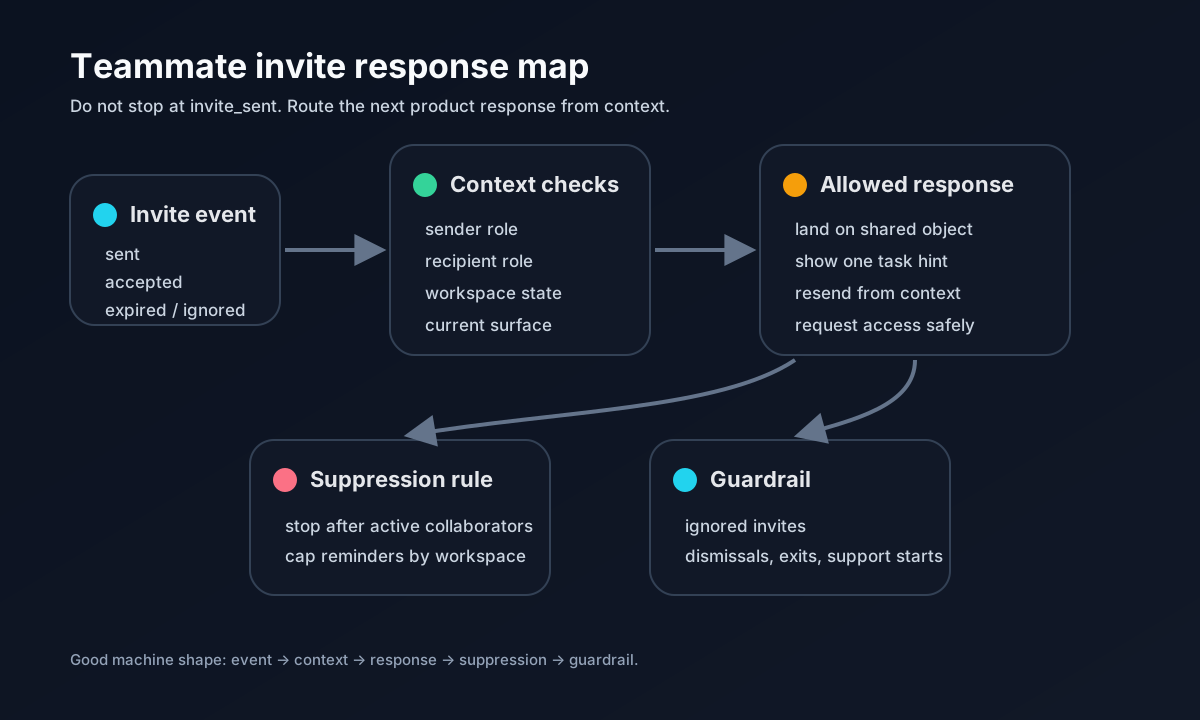
The invite event is only the input. The useful response depends on who sent it, who received it, and what the workspace needs next.
Invited users do not start cold
Userpilot’s invited-user onboarding guide makes a useful distinction: invited team members often enter an existing workspace, with different permissions and different jobs than the admin who set everything up. If you show them the admin onboarding path, you can teach the wrong task.
Appcues makes the same point from another angle. Invited users already have context from the person who invited them, so the product should not treat them like anonymous first-time visitors. The invitation should say who invited them, what workspace they are joining, and what action matters next.
That is the part many products miss. They optimize the email, then dump the accepted user into a generic home screen.
Invite status is not one state
A collaboration loop can fail in different ways:
| Invite state | Better response |
|---|---|
| Admin sent invite, no accept | Show sender one contextual reminder, not a global checklist item |
| Recipient accepted, no first action | Land them on the shared object or task that caused the invite |
| Recipient lacks permission | Offer a safe request path instead of a dead end |
| Invite expired | Let the sender resend from the same workspace context |
| Workspace has enough collaborators | Suppress invite prompts and move to the next value action |
This is why “invite teammates” is a weak onboarding checklist item by itself. The product has to know whether inviting someone is still useful.
Write the invite response row
Before adding another invite prompt or reminder, write one row:
| Field | Example |
|---|---|
| Sender state | Trial admin created first report and invited an analyst |
| Recipient state | Analyst accepted but has not opened the shared report |
| Surface | Report home and invitation landing page |
| Product response | Send recipient to the report with one task-specific hint |
| Suppression rule | Do not show sender another invite prompt for seven days or after two active collaborators |
| Guardrail | No rise in ignored invites, dismissals, or workspace exits |
| Owner | Activation PM owns sender response; collaboration PM owns recipient landing |
The row forces the team to choose. If the recipient has not accepted, the sender may need a gentle status cue. If the recipient accepted but got lost, the recipient needs context. If the workspace is already active, the product should stop begging for more invites.
Do not use invites as fake activation
Invite sent is not the same as collaboration. Invite accepted is not the same as value.
A better activation signal might be: recipient accepted, opened the shared object, completed one relevant action, and the sender came back to that shared work. That is messier than a single event. It is also closer to the truth.
Aircall’s onboarding essay has an old but still good warning: SaaS users are at work, and they have little patience when the product does not show value quickly. An invite flow should respect that. Do not ask the recipient to watch a full tour before they can see why they were invited.
Where Rayform fits
Rayform’s angle is the response layer. Existing analytics can show invite_sent, invite_accepted, role, workspace activity, and the surface where users get stuck. The missing step is turning that state into a product response without waiting for a sprint.
For example: if an admin invites an analyst to review a report, the recipient should land on the report, not a blank dashboard. If the analyst bounces, the next response should help the analyst finish the review, not ask the admin to invite more people.
The practical rule is simple: every invite prompt should know when to appear, when to help, and when to shut up.
A small checklist
Before shipping a teammate invite flow, answer five questions:
- Who is sending the invite, and what are they trying to finish?
- What role or permission will the recipient have?
- Where should the recipient land after accepting?
- When should invite prompts and reminders stop?
- Which guardrail proves the flow did not create noise?
If those answers are missing, the product is not running a collaboration loop. It is sending email and hoping teamwork happens.