Most lifecycle emails are trying to solve a product problem from outside the product.
Day 1 welcome. Day 3 setup nudge. Day 7 trial reminder. The calendar is easy to operate, but it does not know whether the user already reached value, got blocked on setup, invited a teammate, or gave up after staring at an empty dashboard.
Short answer: lifecycle email marketing should start from product state. Decide what the product should do first, then decide whether email is the right channel for that state.
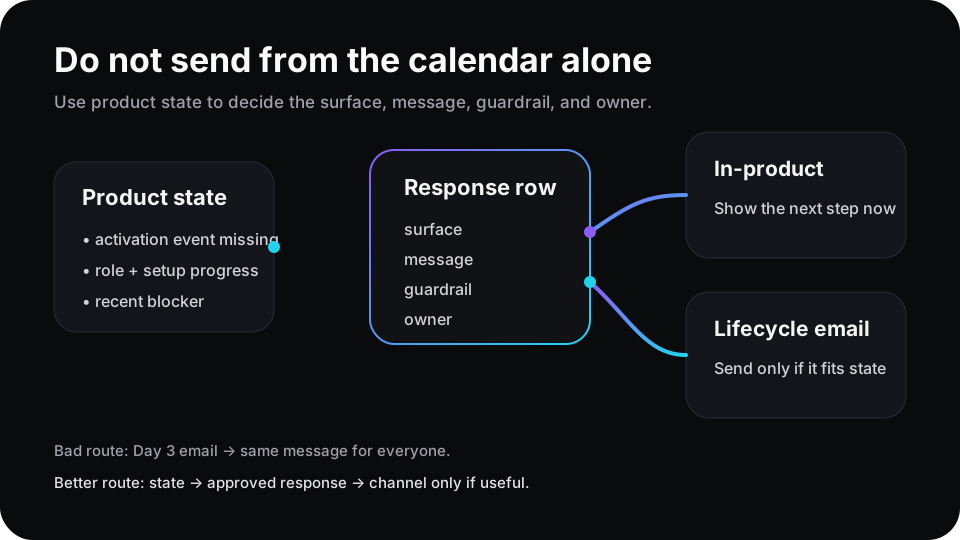
The email is not the strategy. It is one possible response after product state is known.
Behavior beats the drip calendar
ProductLed’s onboarding email guidance is blunt: avoid a purely time-based email flow and trigger messages from what users have or have not done inside the product. Customer.io makes a similar point for lifecycle marketing: journeys can trigger from actions, inaction, and state changes instead of generic timing.
That does not mean every product needs a complicated messaging machine. It means the trigger should describe a real user state.
A weak rule is “send setup email on day 3.” A stronger rule is “send the connector-fix email when an admin tried setup twice, still has no data, and has not seen the fallback path.”
One is a date. The other is a product state.
Write the response before the email
Before adding another lifecycle email, write the response row:
| Field | Example |
|---|---|
| State | Trial admin connected source but no events arrived after 24 hours |
| Surface | Empty dashboard and integration setup page |
| Product response | Show a sample dataset and the shortest debug step |
| Email response | Send only if the user leaves before seeing the fix path |
| Guardrail | No rise in unsubscribes, setup exits, or repeated failed retries |
| Owner | Activation PM owns the response; lifecycle owner owns the email |
This row prevents a common mistake: using email to apologize for a product surface that still has no answer.
If the user is in the product right now, help them there. If they left before seeing the next step, email can bring them back to that exact step. That is a much cleaner job for lifecycle messaging.
Different states need different messages
Userpilot describes PLG lifecycle email marketing as matching messages to customer needs and journey stage. Useful, but journey stage is still too broad by itself. Two “beginners” can need opposite responses.
| Product state | Bad email | Better response |
|---|---|---|
| User completed activation | ”Finish setup” | Suppress the email and show the next workflow |
| User stalled before first value | ”Explore features” | Send one CTA back to the missing activation step |
| Admin hit a setup error | ”Here are docs” | Show the error-specific fix path, then email if they leave |
| Account shows expansion intent | ”Upgrade now” | Match usage, role, and surface before asking |
This is where lifecycle email and product analytics should meet. The analytics stack knows the behavior. The product knows the surface. The lifecycle system knows the channel. The missing piece is the response rule between them.
Email should support product-led onboarding
Appcues frames product-led onboarding around getting users to activation through contextual in-product experiences. Their CloudApp example makes the same practical point: product usage comes first, and email supports onboarding by bringing users back during low engagement or unblocking a missing milestone.
That hierarchy matters. Email should not become the place where every product gap gets explained.
If a user has no data, the product should say why. If a teammate invite is the next value step, the product should show it. If the user leaves before doing it, then the email can point back to the invite surface with the right context.
Where Rayform fits
Rayform’s angle is the response layer between product analytics and the user experience. It can read trusted product state, choose an approved in-product response, and keep lifecycle messaging from drifting into generic drip logic.
This is distinct from behavior-triggered upgrade prompts and free-trial activation. Those are specific conversion moments. The mechanism here is broader: product state decides whether the next response belongs in the UI, in email, or nowhere at all.
Related reading: empty states should move users toward activation, role-based onboarding needs product responses, and integration setup failures need product responses.
See how Rayform turns behavioral signals into runtime UI changes.